
Content blocks
Every picture section that carries words uses the same set of blocks inside a Content group: the slideshow, split banner, video banner, banner columns, parallax banner, the 404 page and the password page. Learn them once and every banner works the same way.
The group
Section titled “The group”A Content group can be placed in any of nine positions over the image. Use the horizontal and vertical offsets to fine-tune its placement, then set its Maximum width, Spacing between items, and optional Text shadow. You can hide the group on desktop or mobile; under Mobile layout, you can also set a separate position and offsets for smaller screens.
The blocks
Section titled “The blocks”- Accent text: the short line above a heading.
- Heading: with a size from small to a custom pixel size, a maximum width in characters, and its own size on mobile.
- Text: a paragraph, with a size and an optional box behind it in a colour scheme.
- Buttons: one or more buttons, each with a label, link and style, aligned left, centre, right or spread.
- Image: a picture inside the group, with a width for desktop and phone, alignment, corners and a link.
- Search box: a form that sends the shopper to the search page.
- Countdown: a clock counting to a moment, below.
- App blocks from any app that offers them.
Countdown
Section titled “Countdown”Set the End date and time in your store’s timezone; every visitor counts to the same moment. A Start date and time keeps the clock off the page until the offer begins. A product’s countdown metafield wins over the block’s date, so one product template can run a deadline per product. When it ends, the clock hides itself or shows an Ended message.
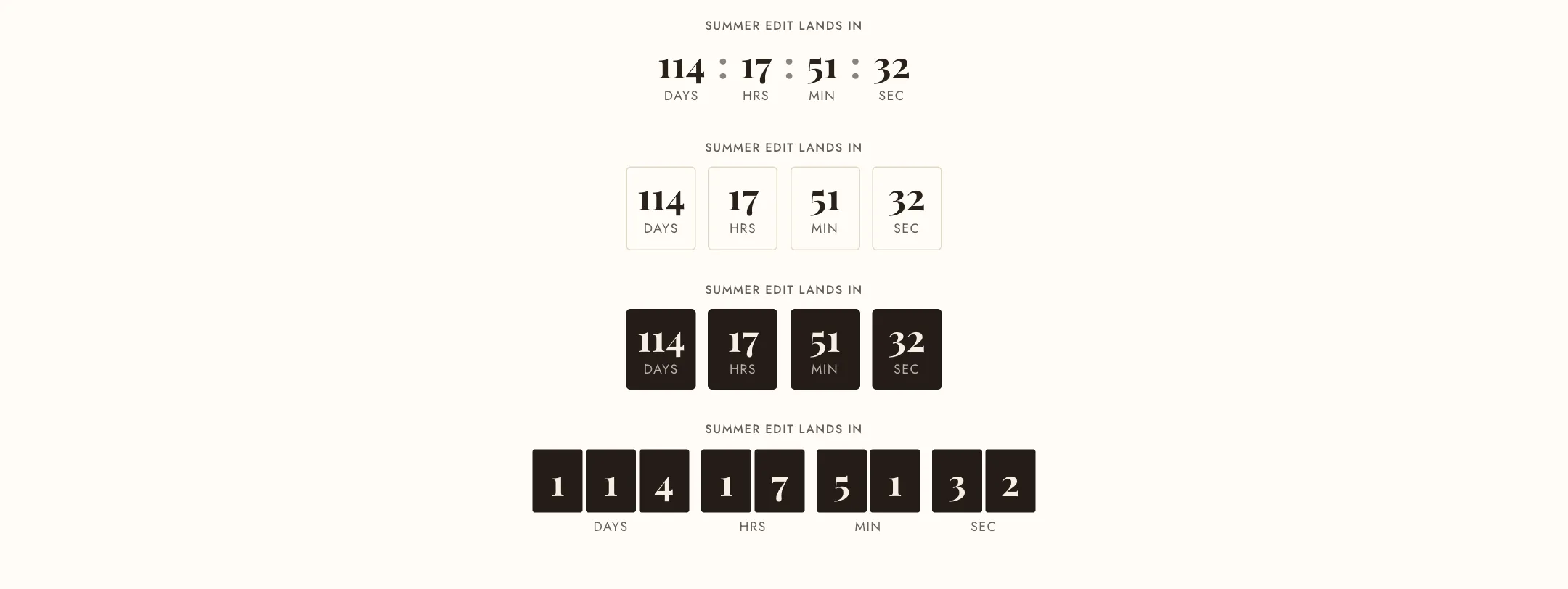
Under Appearance:
- Digit style: Plain numbers with a separator, Outlined cells around each unit, Filled cells in a colour scheme, or Digit tiles, where every digit is its own tile like a flip clock. Filled cells and tiles take a Cell color scheme.
- Separator for the plain style: colon, dot, a line, or none.
- Number font: the heading font or the body font. Digit size from small to display.
- Unit labels: below the numbers, beside them as “2d 04h 12m 33s” for a single line, or hidden.
- Label and Label position: the words such as “Sale ends in”, above the clock or before it on the same line.
- Alignment, Roll the digits for a changed digit to drop into place, and Show a background with its colour scheme.
The days cell steps aside on its own once fewer than a day remains.
On mobile
Section titled “On mobile”Under the countdown’s Mobile layout: Digit size on mobile, the same as desktop or one step smaller, and Alignment on mobile.